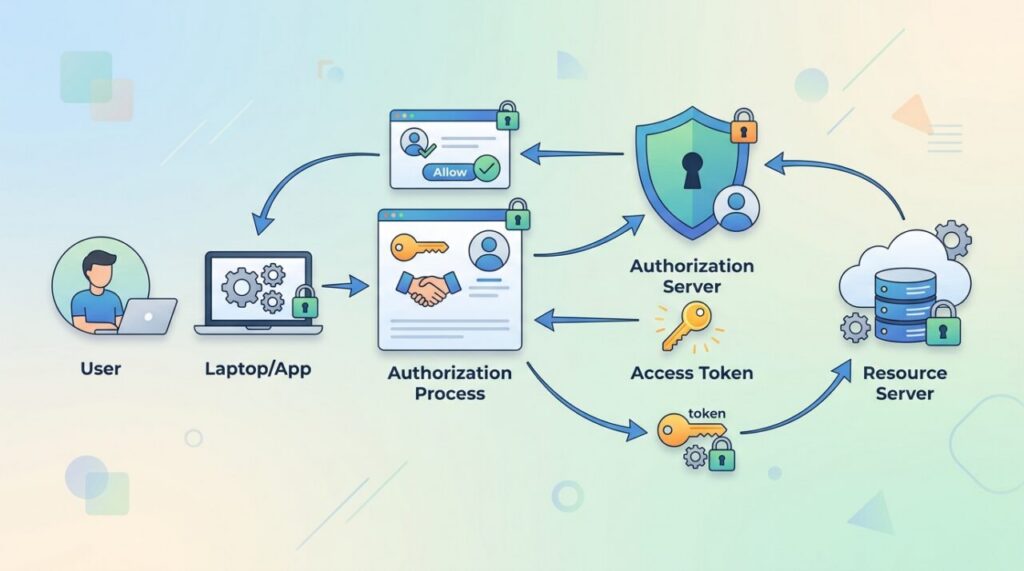

You’ve done it a hundred times: click “Log in with Google,” approve a screen, and you’re in — without ever giving the app your Google password. The system quietly making that safe is OAuth 2.0, the industry standard for letting apps access your data on other services without ever seeing your credentials. It sounds complicated, but the core idea is beautifully simple — and by the end of this guide you’ll understand exactly how “Log in with Google” works under the hood.
The problem OAuth solves
Suppose a photo-printing app wants to access the photos in your Google account. The naive solution would be to hand the app your Google username and password so it can log in as you. That’s a terrible idea: the app could now read your email, change your password, and do anything you can — and you’d have to trust it completely and forever. There’s no way to grant limited access or take it back short of changing your password.
OAuth exists to fix exactly this. It lets you grant an app limited access to specific things, without ever revealing your password, and lets you revoke that access at any time.
The hotel key card analogy
Think of OAuth like a hotel key card. When you check in, you don’t get the master key to the entire building. You get a card that opens only your room, works only for the length of your stay, and can be deactivated at the front desk whenever needed. OAuth issues apps the digital equivalent: a limited-access token that opens only certain doors, for a limited time, revocable at will. Your actual password is the master key, and it never leaves your hands.
The players involved
OAuth defines a few roles that make the flow easier to follow:
- The resource owner — that’s you, the user who owns the data.
- The client — the app that wants access (the photo-printing app).
- The authorization server — the service that logs you in and issues tokens (Google’s login system).
- The resource server — where your data actually lives (Google Photos).
How does “Log in with Google” actually work?
When you click that button, a specific sequence — the authorization code flow — plays out in about a second. Here it is step by step:
The whole point is that your password only ever goes to Google, and the app walks away with a narrow, revocable token instead. Steps 1–4 happen in your browser; step 5 — the sensitive one — happens privately between the app’s server and Google’s, which is exactly what makes the flow secure (more on that below).
Tokens and scopes: the heart of the control
Two concepts give OAuth its precision. The access token is the temporary key the app uses instead of your password; it expires, and it can be revoked. Scopes are the specific permissions attached to it — “read your photos” but not “read your email,” for example. Together they mean an app gets exactly the access you agreed to and no more, for a limited time. That approval screen listing what an app wants? Those are the scopes, shown to you before you consent.
Access token vs refresh token
Access tokens are deliberately short-lived — often just an hour — so a leaked one is only dangerous briefly. But you don’t want to be bounced to a login screen every hour, so OAuth adds a second token: the refresh token. It’s longer-lived and has exactly one job — quietly obtaining a fresh access token when the current one expires, without bothering you.
The division of labour matters for security. The access token travels on every API request (more exposure, so short life); the refresh token is used rarely, only against the token endpoint, so it can be guarded more carefully and revoked to cut an app off. Access tokens are frequently issued as signed JSON Web Tokens — if you want to see what’s actually encoded inside one, our guide to JWT authentication breaks it down.
Authentication vs authorization: the distinction that trips everyone up
These two words sound alike and get used interchangeably, but they answer different questions. Authentication asks “Who are you?” Authorization asks “What are you allowed to do?” Here’s the clean version:
| Authentication | Authorization | |
|---|---|---|
| Question it answers | Who are you? | What are you allowed to do? |
| Example | Proving you’re the Google account owner | Letting an app read your Google Photos |
| OAuth’s role | Not OAuth’s job — handled by OpenID Connect (an ID token) layered on top | OAuth’s core purpose (access token + scopes) |
So OAuth 2.0 is fundamentally an authorization framework. “Log in with Google” feels like authentication because a thin identity layer — OpenID Connect — rides on top of OAuth to prove who you are. They work together, but they are not the same thing, and conflating them is the single most common OAuth misconception.
OAuth grant types (flows) explained
OAuth isn’t one flow but a family of them, called grant types, each suited to a different kind of app. You mostly need to recognize four:
| Grant type | Best for | How it works |
|---|---|---|
| Authorization Code + PKCE | Web apps, mobile apps, SPAs — the modern default | The flow above; PKCE replaces the client secret for apps that can’t keep one |
| Client Credentials | Server-to-server, no user involved | The app authenticates as itself with its own ID + secret |
| Device Code | TVs, CLIs, limited-input devices | You enter a short code on your phone or laptop to approve |
| Implicit / Password | Nothing new — deprecated | Older, less-secure flows; avoid them in new apps |
If you’re building a normal web or mobile app, reach for Authorization Code with PKCE and don’t look back — it’s the current best practice, and every good OAuth library defaults to it.
Why the authorization code exchange exists
A detail from the flow deserves a closer look, because it’s where OAuth’s security cleverness really shows. When Google redirects back to the app, it hands over a temporary authorization code rather than the access token itself — and the app must exchange that code for the token in a separate, server-to-server request that includes the app’s own secret credentials.
Why the extra hop? Because the redirect travels through the browser — visible in the URL bar, in browser history, potentially in logs. If the token itself rode in that redirect, anyone who glimpsed the URL would hold the keys. The code, by contrast, is useless on its own: it’s single-use, expires in minutes, and can only be redeemed by the app that owns the matching client secret. The token then passes directly between servers, never touching the browser. (This is also why the whole flow must run over HTTPS — an intercepted redirect on plain HTTP would undo the protection.) For public clients that can’t hold a secret (mobile apps, SPAs), an extension called PKCE fills the same role cryptographically — and it’s now the recommended default for those apps.
A minimal “Log in with Google” example (Node.js)
Concept sticks better with real code. Here’s the authorization code flow in an Express app, trimmed to the essentials, with the flow stages marked inline:
// 1. Send the user to Google's authorize URL (with scopes + state)
app.get('/auth/google', (req, res) => {
  const state = crypto.randomBytes(16).toString('hex');
  req.session.oauthState = state;                 // remember it, verify on return
  const url = 'https://accounts.google.com/o/oauth2/v2/auth?' +
    new URLSearchParams({
      client_id: process.env.GOOGLE_CLIENT_ID,
      redirect_uri: 'https://myapp.com/auth/callback',
      response_type: 'code',
      scope: 'openid email profile',
      state,
    });
  res.redirect(url);
});

// 2 & 3 happen on Google: the user logs in and approves.
// 4. Google redirects back here with ?code=...&state=...
app.get('/auth/callback', async (req, res) => {
  if (req.query.state !== req.session.oauthState)  // CSRF check
    return res.status(403).send('Invalid state');

  // 5. Exchange the code + client secret for a token — server-to-server
  const r = await fetch('https://oauth2.googleapis.com/token', {
    method: 'POST',
    headers: { 'Content-Type': 'application/x-www-form-urlencoded' },
    body: new URLSearchParams({
      code: req.query.code,
      client_id: process.env.GOOGLE_CLIENT_ID,
      client_secret: process.env.GOOGLE_CLIENT_SECRET,  // never in the browser
      redirect_uri: 'https://myapp.com/auth/callback',
      grant_type: 'authorization_code',
    }),
  });
  const { access_token } = await r.json();
  // 6. Use access_token to call Google's API, then start a session.
});
Notice the two security essentials baked in: the state value guards against CSRF, and the client_secret is read from an environment variable and only ever used server-side. Which brings us to the practical gotchas.
OAuth from the developer’s side
Implementing “Log in with X” for the first time follows a predictable checklist. You register your app with the provider (Google, GitHub, etc.) and receive a client ID (public) and client secret (private — treat it like a password, keep it in an environment variable, and never put it in frontend code or commit it, the same discipline as keeping secrets out of Git). You configure your redirect URI — the exact URL the provider may send users back to. Then your code implements the dance: send the user to the provider’s authorize URL with your client ID and requested scopes; receive the code at your redirect URI; exchange it server-side for tokens.
Two mistakes dominate beginner OAuth bugs, and both are worth internalizing before you write a line: getting the redirect URI wrong, and skipping the state parameter. The next section turns those and their cousins into a quick troubleshooting reference.
Common OAuth errors (and how to fix them)
Almost every OAuth error you’ll hit maps to one of a handful of causes. Keep this list nearby:
redirect_uri_mismatch— the redirect URI in your request doesn’t exactly match one registered in the provider’s console. It’s an exact-string match:httpvshttps, a trailing slash, or a different port all count as different. This is the number-one first-time error. Fix: copy the registered URI verbatim.invalid_client— the provider doesn’t recognize your credentials, usually a wrong, missing, or mistyped client secret (or the secret sent for a public client that shouldn’t have one). Fix: re-check the secret and that you’re hitting the right environment.- Missing or mismatched
state— you didn’t send astatevalue, or didn’t verify it on return, leaving your callback open to CSRF. If SPAs are making these calls from the browser, you’ll also run into CORS rules on the token/userinfo requests. Fix: always generate, store, and verifystate. - Expired or reused authorization code — codes are single-use and live only minutes. Trying to exchange one twice, or too late, fails. Fix: exchange it immediately, once.
- Expired access token — an API call with a stale token comes back as 401 Unauthorized. Fix: use the refresh token to get a new one rather than sending the user through login again.
Reviewing your own OAuth grants
Here’s a practical takeaway anyone can act on in the next two minutes. Every major provider has a page listing the apps you’ve granted access to — for Google it’s under your account’s security settings as “Third-party apps with account access,” and GitHub, Microsoft, and others have equivalents. Skim yours occasionally. You’ll likely find services you tried once in 2019 still holding live grants. Revoking them costs nothing and shrinks your attack surface — and seeing the scopes each app holds makes the whole tokens-and-scopes model satisfyingly tangible.
Why it matters
OAuth is what makes the connected app ecosystem both convenient and safe. It lets you use your Google or GitHub account across countless services without spreading your password everywhere, gives you a single place to review and revoke app access, and limits the damage if any one app is compromised. For developers, understanding OAuth is essential the moment you integrate with any major platform’s API — it sits right alongside fundamentals like REST vs GraphQL and webhooks in the modern API toolkit.
Frequently asked questions
Is “Log in with Google” safer than a password? For most people, meaningfully so. You benefit from Google’s security investment (two-factor auth, anomaly detection), the site never stores a password to leak, and one strong well-protected account beats fifty weak reused ones. For where passwordless is heading next, see passkeys.
What’s the difference between an access token and a refresh token? The access token is short-lived and sent on every API call to prove your permission; the refresh token is longer-lived and used only to obtain new access tokens when they expire, so you don’t have to log in again.
What causes a redirect_uri_mismatch error? The redirect URI in your OAuth request doesn’t exactly match one you registered with the provider. It’s a character-for-character match, so a trailing slash, an http-vs-https difference, or a different port will all trigger it.
What’s the difference between OAuth and OpenID Connect? OAuth 2.0 grants access to resources (“this app may read your calendar”). OpenID Connect is a thin identity layer on top that standardizes proving who the user is — it adds an ID token containing verified identity claims. Social login buttons are technically OpenID Connect riding on OAuth.
What happens when I revoke an app’s access? Its tokens stop working — at the next API call or token refresh, the app is locked out. Anything it already downloaded remains with it, which is a good reason to review grants before, not after, connecting apps to sensitive data.
The takeaway
OAuth 2.0 lets you grant apps limited, revocable access to your data without ever sharing your password — like a hotel key card instead of the master key. You authenticate directly with the trusted service, approve specific scopes, and the app receives a temporary access token for just those permissions. It’s the elegant, secure foundation behind “Log in with Google” and the vast web of app integrations we rely on every day.