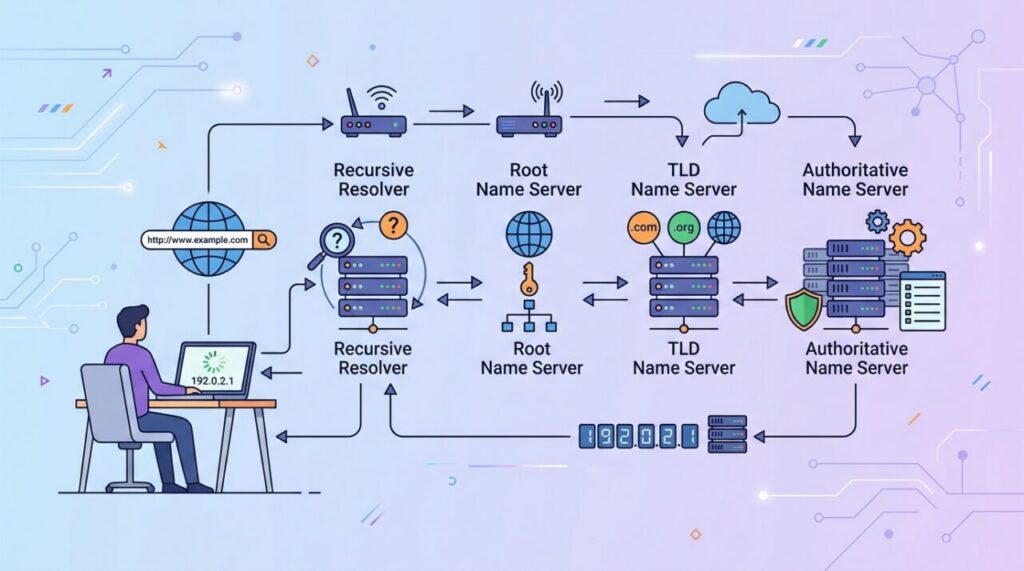

Every time you type a website address, an invisible system springs into action to find it — and it all happens before the page even begins to load. Learning how DNS works explains one of the internet’s most fundamental behaviors: how a human-friendly name like example.com becomes the numerical address a computer actually needs. It’s often called the phone book of the internet, and the comparison is spot on.
The problem DNS solves
Computers don’t find each other by name — they find each other by IP address, a string of numbers like 93.184.216.34. But nobody wants to memorize numbers for every site they visit. We want to type google.com, not a numeric address. DNS — the Domain Name System — bridges that gap. It translates the domain names humans remember into the IP addresses machines use.
Just like you look up a contact’s name in your phone to get their number, your computer looks up a domain name in DNS to get its IP address. You handle the names; DNS handles the numbers.
The four players in a DNS lookup
A single lookup involves a small relay team of servers, each with a specific job:
- The recursive resolver — usually run by your ISP or a service like Cloudflare or Google. It’s the “middleman” that does the legwork of finding the answer for you.
- The root nameservers — the top of the hierarchy. They don’t know the final answer but can point you toward the right direction based on the domain’s ending.
- The TLD nameservers — responsible for a top-level domain like
.comor.org. They know which servers are authoritative for domains under them. - The authoritative nameserver — the final authority that actually holds the real IP address for the specific domain.
How a lookup actually flows
Say you type example.com. Behind the scenes:
- Your computer asks the recursive resolver, “What’s the IP for example.com?”
- The resolver asks a root server, which replies, “I don’t know, but ask the
.comservers.” - The resolver asks a
.comTLD server, which replies, “Ask the authoritative server for example.com.” - The resolver asks that authoritative server, which finally answers with the IP address.
- The resolver hands the IP back to your computer, which can now connect to the website.
All of this typically completes in well under a second, every time — though clever caching means it’s usually even faster.
Caching: why it’s not slow every time
If every visit required that full journey, browsing would be sluggish. So DNS answers are cached at multiple levels — in your browser, your operating system, and the recursive resolver — for a period controlled by a value called the TTL (time to live). Once a name is looked up, the answer is remembered for a while, so repeat visits skip the whole relay and use the stored result. This is why DNS changes aren’t instant: caches around the world need to expire first.
Common DNS record types
DNS stores more than just website addresses. A domain’s records include several useful types:
- A record — maps a domain to an IPv4 address (the classic name-to-number).
- AAAA record — the same, but for a newer IPv6 address.
- CNAME — points one name to another name (an alias).
- MX record — tells the world which mail servers handle email for the domain.
- TXT record — holds arbitrary text, often used to verify domain ownership.
Why this matters to developers
Understanding DNS pays off constantly. When you launch a site, you point your domain’s A record at your server’s IP. When you set up email or verify a domain with a third-party service, you’re adding MX or TXT records. And when a site “isn’t working” right after a change, DNS caching and TTLs are often the reason — knowing that saves hours of confusion. DNS is quietly involved in nearly everything you deploy.
Try it yourself: query DNS from your terminal
DNS becomes much less abstract once you’ve interrogated it directly. The dig command (or nslookup on Windows) lets you ask any DNS question by hand:
dig example.com               # the A record (IPv4 address)
dig example.com MX            # who handles this domain's email
dig example.com TXT           # verification and policy records
dig example.com +trace        # watch the full root -> TLD -> authoritative journey
That last one is the real eye-opener: +trace performs the whole resolution chain in front of you, showing exactly which servers answered at each step. And in every response, note the number next to each record — that’s the TTL in seconds, counting down until resolvers must re-ask. Watching a TTL tick down makes caching suddenly very concrete.
Why “DNS propagation” takes so long (and what actually happens)
Change a DNS record and you’ll be told to wait “24–48 hours for propagation.” The phrase is misleading — nothing is being pushed out across the internet. What’s really happening is passive: resolvers all over the world are holding your old record in cache and will keep serving it until its TTL expires. Only then do they re-query and discover your change. Different resolvers cached at different moments, so the change appears at different times for different users — that’s the whole mystery.
The professional trick: lower the TTL in advance. A day before a planned migration, drop the record’s TTL from, say, 3600 seconds to 300. Once the old long TTL has aged out everywhere, any subsequent change takes effect within five minutes globally. After the migration settles, raise the TTL back up. This one habit turns nail-biting DNS cutovers into non-events.
When DNS is the problem: a quick debugging guide
“It works on my machine but not theirs” and “the site is down but the server is fine” are frequently DNS stories. A quick triage: run dig against your domain and check the answer is the IP you expect. Then query a specific public resolver (dig @8.8.8.8 example.com) to see whether your local resolver’s cache is the odd one out. If answers differ between resolvers, you’re watching propagation in action. And if your machine alone misbehaves, flush your OS’s DNS cache before doing anything drastic.
Frequently asked questions
What’s the difference between a registrar and DNS hosting? The registrar is where you bought the domain; DNS hosting is who answers queries for it. They’re often the same company by default, but don’t have to be — many developers register in one place and point the domain’s nameservers at a different DNS host (like Cloudflare) for speed and features.
Should I use 8.8.8.8 or 1.1.1.1? Both Google’s and Cloudflare’s public resolvers are fast, reliable upgrades over many ISP defaults. The differences are marginal — pick either; the bigger win is simply using a well-run resolver.
Can DNS leak private information? Traditionally, DNS queries traveled unencrypted, meaning networks could observe which domains you look up. Encrypted DNS (DoH/DoT — DNS over HTTPS/TLS) closes that gap and is increasingly the default in modern browsers and operating systems.
The takeaway
DNS is the internet’s phone book: it turns the domain names humans remember into the IP addresses machines connect to. A lookup relays through a resolver, root, TLD, and authoritative servers, then gets cached so future visits are fast. Grasp this system — and the record types and TTLs that go with it — and a whole category of deployment and networking mysteries becomes clear and manageable.