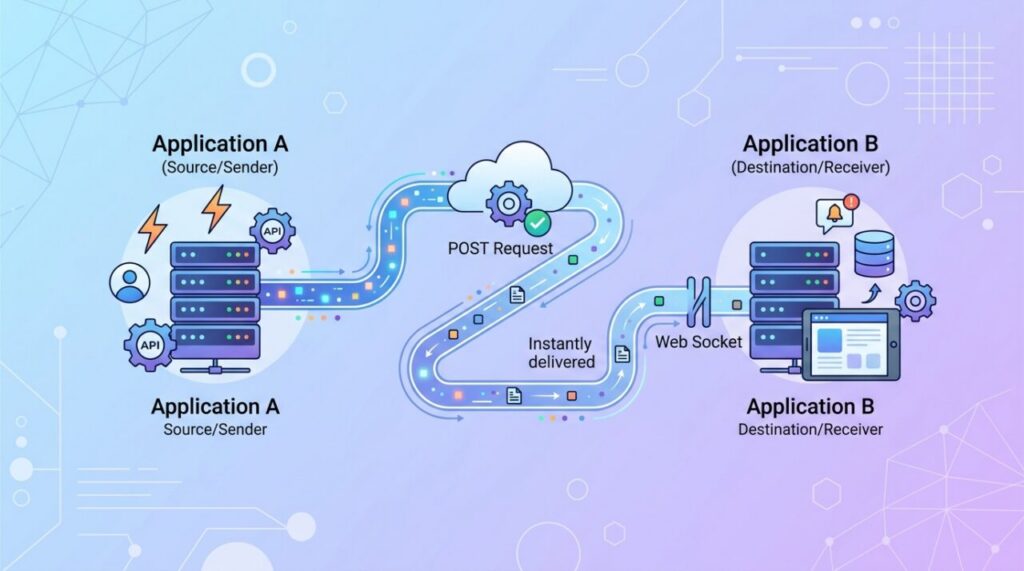

When a payment succeeds in Stripe, a message posts in Slack, or a new commit triggers a deployment, something had to deliver that news instantly. Very often, that something is a webhook. Webhooks are the quiet workhorses of app integrations — and while they sound technical, the concept is genuinely simple once you see the problem they solve.
The problem: how do you know when something happens?
Imagine your app needs to know the moment a customer completes a payment on another service. One approach is polling: your app repeatedly asks, “Any new payments? Any new payments now? How about now?” every few seconds. That works, but it’s wasteful — most of those checks return nothing, and you still get the news late, only on your next poll.
Webhooks flip this around. Instead of your app constantly asking, the other service simply tells you the instant something happens. No wasted requests, no delay.
What a webhook actually is
A webhook is an automated HTTP request that one service sends to another when a specific event occurs. You give the service a URL — an endpoint on your server — and say, “whenever this event happens, send a POST request to this URL with the details.” The service does exactly that, delivering a small package of data (the payload) describing what happened.
People often call webhooks “reverse APIs.” With a normal API, you make the request when you want data. With a webhook, the other service makes the request to you when it has news. The direction of the call is flipped.
The doorbell analogy
Polling is like opening your front door every thirty seconds to check whether a package has arrived — exhausting and usually pointless. A webhook is a doorbell: you install it once, then go about your day, and it rings you the moment a delivery shows up. You’re notified exactly when there’s something to know, and never bothered when there isn’t.
How the flow works
- You register a webhook URL with a service and choose which events you care about.
- The event happens (a payment, a new signup, a code push).
- The service sends an HTTP POST to your URL, with a payload describing the event, usually as JSON.
- Your server receives it, does whatever it needs to (update a record, send an email, kick off a job), and responds with a success status so the sender knows it arrived.
Webhooks vs APIs: when to use which
They’re complementary, not competing. Use a regular API when your app needs data on demand — you decide when to ask. Use a webhook when you need to react to events as they happen without constantly checking. Many integrations use both: webhooks to get notified that something changed, and an API call to fetch the full details if needed.
Securing your webhooks
Because a webhook endpoint is a public URL that accepts incoming data, security matters — otherwise anyone could send fake events to it. Two practices are essential. First, verify the signature: reputable services sign each webhook with a secret only you and they know, so you can confirm the request genuinely came from them and wasn’t forged. Second, always serve your endpoint over HTTPS so payloads can’t be read or tampered with in transit. Never blindly trust incoming webhook data without verifying it first.
Handling them reliably
A couple of practical habits prevent headaches. Respond quickly with a success status and do heavy processing afterward (ideally in a background job), because senders often time out if you take too long. And design your handler to be idempotent — able to safely handle the same event arriving twice — since networks occasionally cause duplicate deliveries. Getting these right makes your integrations robust instead of flaky.
What a webhook handler looks like
Concretely, a webhook receiver is just a normal route on your server. Here’s the skeleton in Express, including the two habits that matter — verifying the signature and responding fast:
app.post('/webhooks/payments', express.raw({ type: 'application/json' }), (req, res) => {
  // 1. Verify this really came from the provider
  const signature = req.headers['x-signature'];
  if (!verifySignature(req.body, signature, WEBHOOK_SECRET)) {
    return res.status(400).send('invalid signature');
  }

  // 2. Acknowledge immediately...
  res.status(200).send('ok');

  // 3. ...then process asynchronously
  queue.add(JSON.parse(req.body));
});
Note the raw body parsing: signatures are computed over the exact bytes sent, so if your framework parses and re-serializes the JSON first, verification will mysteriously fail. This detail alone accounts for a remarkable share of “webhook signature invalid” support tickets.
Testing webhooks locally
Webhooks pose a chicken-and-egg problem during development: the provider needs a public URL to call, but your code runs on localhost. Three standard solutions exist. Tunneling tools like ngrok give your local server a temporary public URL — start the tunnel, register the URL with the provider, and real webhooks flow to your laptop. Provider CLIs often do this natively; Stripe’s CLI, for instance, forwards live test events to localhost with one command. And most dashboards offer a “send test event” button for quick checks. Whichever you use, also save a few example payloads as fixtures so your test suite can exercise the handler without any network at all.
Delivery guarantees: plan for retries and duplicates
Networks fail, and webhook senders know it — so if your endpoint doesn’t respond with a 2xx quickly, most providers will retry, often repeatedly over hours with increasing delays. This is good (you don’t lose events during a deploy) but has a sharp edge: retries mean the same event can arrive more than once, and occasionally out of order.
The defense is idempotent processing. Most providers include a unique event ID in each payload; record the IDs you’ve processed and skip any you’ve seen before. For ordering, trust timestamps or object versions in the payload rather than arrival order. Handlers built this way shrug off network chaos; handlers that assume exactly-once, in-order delivery eventually double-charge someone.
Frequently asked questions
What happens if my server is down when a webhook fires? Reputable providers retry failed deliveries on a backoff schedule, and most keep an event log where you can manually replay missed events afterward. Check both facts for any provider you depend on — retry policies vary widely.
Can I send webhooks from my own app? Absolutely, and it’s a great feature for any platform: let users register URLs, POST them JSON on events, sign each request with a per-user secret, and retry failures. You’ll suddenly appreciate every design decision described above from the other side.
Are webhooks real-time? Near enough for most purposes — delivery typically happens within seconds of the event. For sub-second needs inside one interactive session (live cursors, chat), a persistent connection like a WebSocket is the better tool; webhooks excel at server-to-server event delivery.
The takeaway
Webhooks let services notify your app the instant an event happens, replacing wasteful “are we there yet?” polling with an efficient “I’ll call you when it’s ready” doorbell. They’re essentially reverse APIs: the other service calls you. Register a URL, receive event payloads, verify their signatures, and respond fast — and you’ve got the real-time, event-driven backbone that connects modern apps together.